
Plant Parent: Plant Care Guide
Glority Global Group Ltd.Lifestyle
4.52.26K Reviews
- Version
- 1.110
- Installs
- 10.00M
- Age Rating
- Everyone
Screenshots
Our Review of Plant Parent: Plant Care Guide
 Analysis by Appyee
I use a plant-care app most when I want to turn good intentions into a routine I can actually keep. Plant Parent: Plant Care Guide is aimed at that everyday problem: remembering what each houseplant needs while learning enough to spot trouble early. It suits people who enjoy having a growing collection but don’t want to rely on memory or hunt through care articles every time a leaf changes.
A repeatable routine for a mixed collection
My most useful approach is to treat the app as a care log and reminder system, not as an authority that makes every decision for me. I add plants one at a time, check that each identification makes sense, and then use the suggested schedule as a prompt to inspect the plant. That last step matters: a reminder is a good reason to look at the soil and leaves, not automatic proof that watering is due.
This makes the app especially handy when different plants live in different parts of a home. A bright windowsill succulent and a plant in a cooler corner may need different attention, and a single mental rule for the whole collection is rarely reliable. Keeping their care plans separate helps me avoid treating every pot the same just because they sit together.
Settings and details worth checking
Plant care advice is only as useful as the plant information behind it. When I add a plant, I take an extra moment to verify the suggested identity rather than accepting the first close match. Many houseplants have similar-looking leaves, and a mistaken identification can lead to an unhelpful schedule. If I’m unsure, I compare more than one feature, such as leaf shape and growth pattern, before relying on the recommendation.
I also pay attention to the conditions around the plant. A room’s light, airflow, and temperature can differ from what a general care profile assumes, while local weather can change how quickly a pot dries. I use the schedule as a starting point, then adjust my real-world judgment to the plant’s location and condition. This is a better fit for experienced users too: the app can help organize routine tasks without replacing observation.
Faster habits that prevent avoidable mistakes
For a larger collection, I find it easier to check reminders in batches than to react to each one as a separate interruption. I might inspect the plants in one room together, then move to another area, while still deciding individually whether each one needs water. This saves time without turning a reminder into a blanket instruction to pour water into every pot.
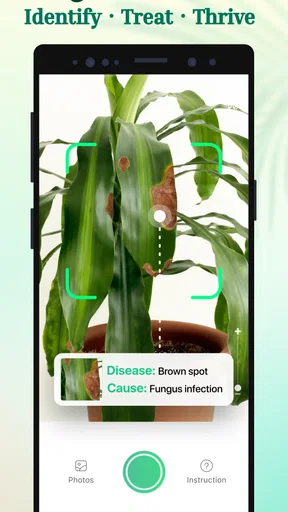
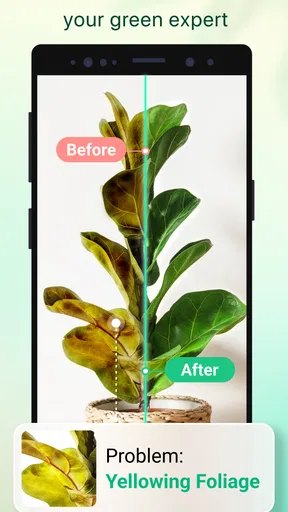
A quick photo when something looks different can also make a useful comparison point. If a plant starts drooping or develops marks, I can look at the current appearance alongside what I noticed before and use the diagnosis tool to explore possible causes. I wouldn’t treat an image result as a definitive answer: watering, light, pests, and normal aging can produce symptoms that look alike. The practical value is that it gives me a place to begin checking rather than leaving me to guess blindly.
Another helpful habit is to keep the collection manageable when entering it. Adding every plant at once can feel like work, particularly if I’m still learning their names. Starting with the plants I most often forget, then adding the rest as I care for them, makes setup less of a chore and lets me check whether the reminders fit my routine.
Where it helps—and where another approach may suit you
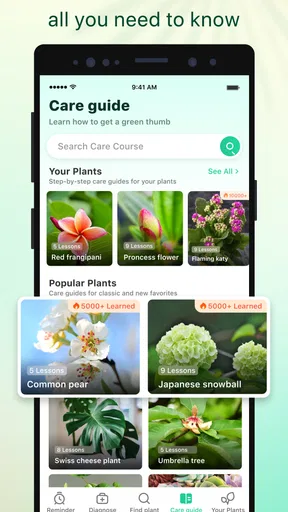
Plant Parent is a strong match for beginners who want prompts and plain guidance, as well as for busy owners with enough plants that individual care dates become hard to remember. It can also help someone returning to the hobby after losing plants, because a structured routine makes it easier to notice patterns and build confidence. The community element may be encouraging if sharing progress and learning from other plant lovers is part of the fun.
It’s less suitable for someone who wants only a bare-bones alarm, or who already keeps a detailed notebook and prefers total control over every schedule. A calendar or simple notes app may be faster for a small collection if all you need is a reminder you set yourself. Likewise, readers who want an authoritative diagnosis should treat the photo-based suggestions as leads to investigate, not a substitute for careful inspection or specialist advice when a plant is seriously unwell.
Compared with searching the web whenever a plant looks wrong, a dedicated care app has the advantage of keeping plant-specific routines and reminders together. General articles can offer deeper explanations and multiple viewpoints, but they can be harder to connect to a particular plant in the moment. I see Plant Parent as the convenient organizer in that comparison, while independent research remains useful when the advice seems mismatched to the conditions at home.
Getting Started with Plant Parent
First things first, downloading Plant Parent: Plant Care Guide is a breeze. You can find it on both Android and iOS, making it super accessible no matter what device you’re using. As soon as you open it, you’re greeted with a clean, user-friendly interface that’s as inviting as a cozy greenhouse.
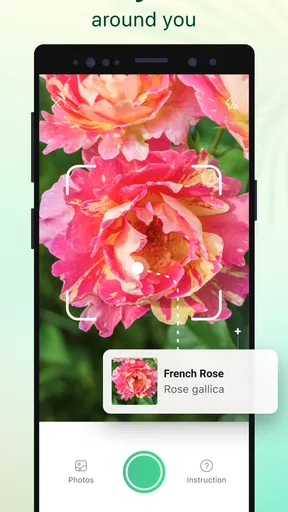
Setting up your plant collection is straightforward. You just take a picture or select from a list of common plants, and voilà, the app starts tailoring care instructions specifically for your leafy friends. It’s almost like magic the way it can recognize a ficus from a fern!
Features That Stand Out
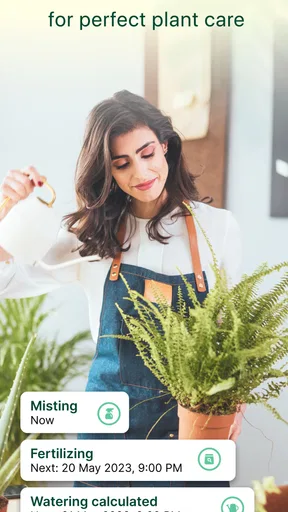
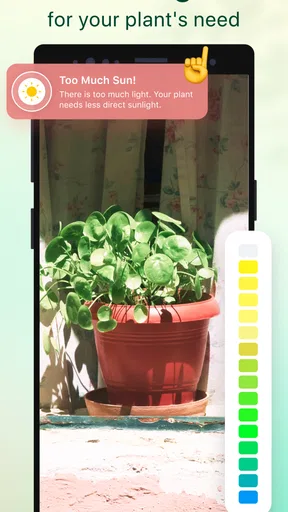
One of the coolest features has to be the personalized plant care schedules. The app takes into account your plant’s species, its current health, and even the weather in your area to suggest when to water, fertilize, or rotate your plants. It’s like having a plant sitter who never sleeps.
There’s also a nifty diagnosis tool that can help you figure out why your peace lily looks a little droopy or why your succulent seems under the weather. Simply snap a photo, and the app analyzes the image to offer possible solutions. It takes a lot of the guesswork out of plant care.
Why I’m Loving It
What really makes Plant Parent: Plant Care Guide shine is its community feature. It’s like a social network for plant enthusiasts! You can connect with other users, share tips, and even brag about your latest plant success. It’s pretty motivating to see how other people are growing their green collections.
Plus, the app sends gentle reminders, so you’ll never forget to water your snake plant again. It’s a lifesaver for those of us with busy schedules who could use a bit of a nudge now and then.
A Few Things to Keep in Mind
While the app is fantastic, it’s worth noting that some of the advanced features require a subscription. However, the free version still offers plenty of useful tools to get you started on your plant care journey. The app is free to download, with in-app purchases ranging from $2.99 to $39.99 per item, so I’d check what is included before deciding to pay.
Also, it’s mostly reliant on the information you feed it. So, if you’re not exactly sure what type of plant you have, you might need to do a bit of research. But honestly, that’s part of the fun of plant parenting, right?
Everyday use, without handing over your judgment
Imagine getting home after a busy day and seeing a reminder for a plant in the living room. Rather than watering it immediately, I’d check the soil and look for signs of stress, then consider whether the room has been especially warm or the plant has recently been moved. That short pause is the difference between using the app thoughtfully and following a schedule too literally. It also makes the routine more educational: over time, I can connect a plant’s appearance with its care and surroundings.
For a holiday or a week when work gets hectic, a collection of reminders can help me make a quick handover plan for someone else. I’d still give a helper simple, plant-specific instructions instead of asking them to follow every notification without context. This is a practical strength of keeping care organized, but it doesn’t make the app a substitute for a person who can inspect plants while I’m away.
If the diagnosis suggestions don’t fit what I see, I’d use them as a checklist rather than keep repeating the same treatment. I would inspect the underside of leaves, check whether the soil is staying wet, and think about recent changes in light or placement. That approach reduces the risk of treating a symptom while missing its cause. It is also a sensible limit for any photo-based plant tool: a picture can help narrow possibilities, but it cannot capture every detail of the plant’s environment.
Who should try it, and who can pass
The app comes from Glority Global Group Ltd. and sits in the lifestyle category, which feels appropriate for a tool built around everyday home routines. It has a 4.5 average from around 103,000 ratings, with over 10 million installs. Those figures suggest broad interest, but they don’t tell me whether its reminders suit a particular home, so I’d judge it by how well the setup matches my plants and habits.
It’s free to start, rated for Everyone, and version 1.104 supports Android 8.0 and later. Those details make it accessible to many households, though anyone using an older Android device should check compatibility before planning a collection around it. I’d also keep the optional purchases in mind if I’m comparing it with a free notes app or a handwritten care chart.
If you have just one hardy plant and already remember its needs, a dedicated app may feel like extra administration. If your plants have different routines, you travel, or you’re still learning how to read signs of stress, the structure can be worthwhile. The best fit is someone who wants support and is willing to verify advice against what the plant is actually doing.
Final Thoughts
All in all, Plant Parent: Plant Care Guide is a delightful companion for anyone looking to turn their home into a lush indoor jungle. It’s user-friendly, packed with features, and genuinely helpful. Whether you’re a seasoned plant parent or just getting started, this app is definitely worth a download. So, go ahead and give your plants the care they deserve. Happy growing!
My recommendation comes with one simple caveat: let reminders create a habit of checking, not a habit of watering on autopilot. Used that way, Plant Parent can make a collection easier to manage while leaving room for the observation that good plant care still requires. If you prefer to learn through routine, keep a closer eye on several plants, and enjoy sharing successes with other enthusiasts, it’s a useful companion. If you want only a no-frills timer or expect a photo to settle every plant problem, a simpler tool or more hands-on research may serve you better.
Verdict
Strengths of Plant Parent: Plant Care Guide
- User-friendly interface simplifies plant care.
- Comprehensive database of various plant species.
- Customizable watering and care schedules.
- In-app reminders to ensure timely plant care.
- Detailed growth tracking for each plant.
Limitations of Plant Parent: Plant Care Guide
- Requires internet for full database access.
- Premium features behind a paywall.
- Occasional syncing issues with reminders.
- Limited customization for exotic plants.
- Ads can be intrusive in the free version.
Other Releases by Glority Global Group Ltd.
View All
PictureThis - Plant Identifier
Education4.6

Mobile Scanner App - Scan PDF
Productivity4.7

GrowIt: Vegetable Garden Care
Lifestyle4.3
Similar Picks in This Category
View All
SmartThings
Samsung Electronics Co., Ltd.4.6

Google Home
Google LLC4.0

Pinterest4.2

Astrotalk - Talk to Astrologer
Astrology & Horoscope4.7

My Verizon
Verizon Consumer Group4.5

Samsung Wallet (Samsung Pay)
Samsung Electronics Co., Ltd.4.1
Frequently Asked Questions
What is Plant Parent: Plant Care Guide?
Plant Parent: Plant Care Guide is an app designed to help users care for their indoor and outdoor plants. It provides personalized care schedules, reminders, and expert tips, making it easier for plant enthusiasts to nurture their green companions. The app also offers a plant identification feature to assist in recognizing and understanding plant species.
How does the plant identification feature work?
The plant identification feature in Plant Parent: Plant Care Guide uses advanced image recognition technology. Users can take a photo of a plant, and the app quickly analyzes the image to identify the species. It then provides detailed information about the plant’s care needs, including watering, sunlight, and soil preferences.
Can I customize the care schedule for my plants?
Yes, Plant Parent: Plant Care Guide allows users to customize care schedules. Users can input specific information about their plant’s needs, such as watering frequency and light requirements. The app will then generate a tailored schedule and send reminders, ensuring each plant receives the appropriate care at the right time.
Is Plant Parent: Plant Care Guide suitable for beginners?
Absolutely! Plant Parent: Plant Care Guide is designed to be user-friendly for beginners. It offers step-by-step instructions and expert tips, making it easy for novice plant owners to understand how to care for their plants. The app’s intuitive interface and comprehensive guides ensure that even those new to gardening can succeed.
Does the app require an internet connection to function?
Plant Parent: Plant Care Guide primarily requires an internet connection for features like plant identification and accessing the latest care tips. However, once the care schedules are set up, the app can function offline for reminders and local notifications, ensuring users can still receive alerts about their plant care routines without being connected.
